
How to Download TikTok Audio on Browser: MP3 Music and Original M4A Audio
March 26, 2026
TikGo Technical Review
- Xiaomi Redmi Note 11 Pro with Chrome on Android
- iPhone 11 with Safari on iOS
This guide is based on how TikGo currently displays TikTok audio options on browser, including MUSIC TRACK MP3 and M4A (Extract), along with actual testing processes on Android Chrome and iPhone Safari.
TikGo doesn't just have one type of "TikTok audio". On supported public TikTok links, you may encounter two different audio outputs: MUSIC TRACK MP3 and M4A (Extract). These are not two different names for the same file.
The most important point is this: MUSIC TRACK MP3 is usually the song or music inserted into the video, while M4A (Extract) is the original audio of the video itself. The original audio may include voice, car sounds, environmental noise, sound effects, and even the music playing in the video. Therefore, if you want to get the entire original sound of the clip, just clicking the MP3 button is not enough.
💡 TIP
MUSIC TRACK MP3 if you only want the music/song attached to the video. Choose M4A (Extract) if you want the original audio of the video, including voice and other sounds. M4A (Extract) is usually slower because TikGo needs to process render/extract before returning the file.What this guide helps you with
Use this article if you want to:
- understand the difference between
MUSIC TRACK MP3andM4A (Extract) - know when to download the music track and when to download the original video audio
- avoid downloading MP3 by mistake when you actually need the voice or background sound of the clip
- know why
M4A (Extract)might take more time - understand why TikGo differs from many TikTok downloaders that stop at music track or video
This guide is not intended to bypass private content or force audio export from posts that are no longer public. It only applies to public TikTok links that TikGo supports.
Two audio types TikGo supports
1. MUSIC TRACK MP3
This is the music or song attached to the TikTok video. For many videos, this is the short music clip used as background, remix, or synchronized to a sound trend.
You should choose MUSIC TRACK MP3 when:
- you only need the song playing in the video
- you don't need the voice of the person recording
- you don't need environmental sounds, car noises, people sounds, or other effects
- you want a compact file, fast download, and easy reuse
Points to remember:
- this is not the full original audio of the video
- duration is usually much shorter, often under
60seconds - if the video has conversation or noise, those parts are usually not in this file
2. M4A (Extract)
This is the original audio extracted from the TikTok video itself. It usually includes:
- voice
- background and environmental sounds
- sound effects
- the music playing in the video
You should choose M4A (Extract) when:
- you want to keep the entire real sound of the clip
- you need speech or voice-over in the video
- you want audio to re-edit the clip, cut sound, transcript, or reference original content
- you want an output that many other downloaders usually do not support
Points to remember:
M4A (Extract)is not "an MP3 with a different name"- this is a render/extract processing branch so it is usually slower than
MUSIC TRACK MP3 - duration can be much longer than the music track, and in supported videos can be up to about
60minutes
Which option to choose in each case
| Need | Option to Choose | What You Will Get | Note |
|---|---|---|---|
| Only want the song inserted in the video | MUSIC TRACK MP3 | Music track of the video | Usually short, downloads faster |
| Want to hear both speech and music | M4A (Extract) | Original audio of the video | Includes voice, ambience, effect |
| Want to cut speech from clip for further processing | M4A (Extract) | Full audio for editing | More suitable than MP3 music track |
| Want compact file just to listen to trend music | MUSIC TRACK MP3 | Separate music track | Does not keep speech or noise |
| Want output close to real sound in video | M4A (Extract) | Extracted original audio | May need to wait for render |
Which links to use to check TikTok audio
If you want to see both audio branches clearly, start with a public TikTok video post link:
https://www.tiktok.com/@username/video/...https://vm.tiktok.com/...
This is a clearer choice than:
- URLs copied incompletely
- private or deleted links
- links opened in the app's browser
/music/...links when your goal is the original audio of a specific video
/music/... can be useful for browsing by sound, but if you want to know if that video has MUSIC TRACK MP3, M4A (Extract), or both, then the public video post link is still the more accurate starting point.
Quick version: 3 steps
- Copy the public TikTok video link.
- Open TikTok Downloader using Safari or Chrome, then paste the link.
- Choose:
MUSIC TRACK MP3if you only want the music partM4A (Extract)if you want the original audio of the video
How to download the correct audio type on TikGo
Step 1: Copy the correct public TikTok video link
Prioritize the actual video post URL. This is the easiest way for TikGo to analyze the correct audio options related to that video.
Step 2: Open TikGo using Safari or Chrome
Some in-app browsers may make the download process look like it failed, or cause you to misunderstand that the audio option is not working. Try on a full browser first.
Step 3: Check the audio buttons TikGo returns
On the results screen, you may see buttons such as:
HDSDWATERMARKM4A (Extract)MUSIC TRACK MP3
At this point, the important thing is not "which button is audio", but "which audio is right for your needs".
- Want music track: choose
MUSIC TRACK MP3 - Want original audio of the clip: choose
M4A (Extract)
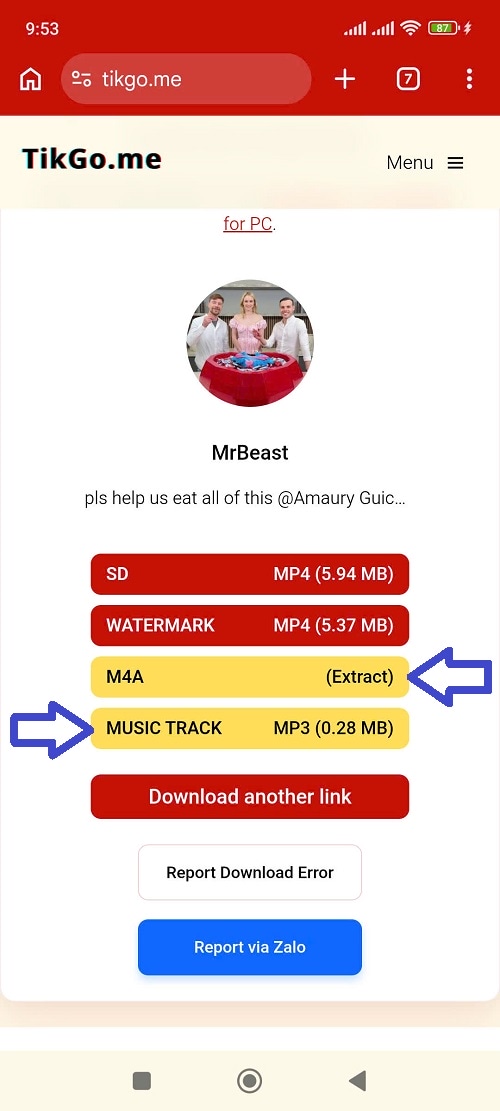
Illustration: MUSIC TRACK MP3 is the separate music track of the video, while M4A (Extract) is the original audio extracted from the video itself.
Step 4: Wait for the correct processing type then save the file
With MUSIC TRACK MP3, the process is usually lighter and faster.
With M4A (Extract), you may have to wait longer because TikGo needs to extract the original audio from the video. This is normal, not a sign the button is broken.
On iPhone, files may be saved via Files first. On Android, files usually go through the Downloads folder.
Why many people confuse MP3 with original video audio
The most common misunderstanding is thinking that any audio button represents the entire sound of the video.
Reality on TikGo:
MUSIC TRACK MP3is the music trackM4A (Extract)is the original audio of the video
Therefore:
- if you download MP3 and don't hear speech, that is usually not an error
- if you need both speech and music, go back and choose
M4A (Extract)
This is also a key difference compared to many other TikTok downloaders. Many tools only return video or a simple music file, while TikGo can also return M4A (Extract) for the original audio of the video in supported cases.
Common issues and how to fix them
I download MP3 but there is no voice
That is usually correct for MUSIC TRACK MP3, because this file is mainly the music track of the video. If you need speech, use M4A (Extract).
M4A (Extract) is slower than MP3
That is normal. M4A (Extract) is the original audio processing branch so it usually needs render/extract before downloading.
I only see video, no audio options
Try again with:
- Full public video post URL
- Safari or Chrome instead of in-app browser
- a new link paste
If needed, send that case to TikGo for checking.
I use /music/... link but results are not as expected
If your goal is the audio of a specific video, switch to the video post link /@user/video/... instead of continuing to stick to the sound page link.
I open the page in the app's browser
Switch to Safari or Chrome before trying again.
Note on sources and evaluation method
This guide is based on how TikGo currently displays two different audio output types for supported public TikTok links:
MUSIC TRACK MP3M4A (Extract)
In this article:
- when saying
MP3, TikGo is talking about the music track of the video - when saying
M4A, TikGo is talking about the original audio extracted from the video
Content also follows actual testing processes on Xiaomi Redmi Note 11 Pro + Chrome and iPhone 11 + Safari.
If you cite this page, consider this as TikGo's current guide on the two TikTok audio branches on browser. Final options may still change depending on the source post, how the source displays files, public status of the video, and browser environment.
Official references
TikGo also checks TikTok's official Support pages to understand more context from the original platform:
These pages are useful for understanding platform context. The distinction between MUSIC TRACK MP3 and M4A (Extract) in this article is TikGo's specific guide.
Frequently Asked Questions (FAQ)
Is MUSIC TRACK MP3 the full original audio of the video?
No. It is usually the music or song attached to the video, not the entire original sound of the clip.
Does M4A (Extract) include voice and background sounds?
Yes. This is why it is more suitable when you want to get the original sound of the video.
Why is MUSIC TRACK MP3 usually shorter?
Because that is the music track accompanying the video, usually a short music clip rather than the entire original audio.
Why is M4A (Extract) slower?
Because TikGo needs to process render/extract original audio from the video before returning the download file.
When should I prioritize M4A (Extract)?
When you need:
- voice
- background sounds
- sound effects
- entire real sound of the video for editing or reference
What should I send if the returned audio is not as expected?
Use the /contact page and send:
- Public TikTok URL
- your device and browser
- whether you clicked
MUSIC TRACK MP3orM4A (Extract) - a short description of the type of sound you actually want to get