
How to Download TikTok Videos Without Watermark on Android (Samsung, Oppo, Xiaomi) 2026
March 15, 2026
TikGo Technical Review
Xiaomi Redmi Note 11 Pro with Chrome on Android
This guide is based on first-party screenshots and a recorded Android test flow captured on the device above.
Downloading TikTok videos on Android is usually straightforward, but the real experience still depends on the browser you use, where Android saves the file, and what download options the original public video actually exposes.
This guide is for people who want a practical Android workflow, not a vague promise. It shows the exact browser-first flow TikGo tested, explains where the file goes after download, and covers the most common Android problems users run into.
Before you start
This workflow was tested on a Xiaomi Redmi Note 11 Pro using Chrome on Android, and it is also relevant for Samsung Galaxy, Oppo, Xiaomi, Vivo, Realme, Pixel, and other Android phones using a standard mobile browser.
Make sure you have:
- a public TikTok video link
- Chrome or another normal Android browser
- enough storage space for the file
- the TikGo page opened in your browser, not trapped inside an in-app browser if possible
If you copy a link from TikTok and then open TikGo inside Facebook, Instagram, Telegram, or another app browser, downloads may feel less reliable than they do in Chrome.
What TikGo can help with on Android
When a public TikTok link is supported, TikGo can help you:
- save a video without watermark when the source provides that clean file
- save available audio options such as MP3 when that workflow is offered
- download without installing an APK or browser extension
- keep the whole flow inside a normal mobile browser
TikGo does not invent extra quality levels or fake download buttons. If a public video exposes one usable file, that may be the only option you see.
Android video walkthrough
If you prefer to watch the flow first, use this quick tutorial:
Fast version: 3 steps
- Copy the public TikTok link from the TikTok app.
- Open TikGo in Chrome and paste the link.
- Choose the file TikGo returns and let Android finish the download.
If you want the full walkthrough, continue below.
Full step-by-step guide on Android
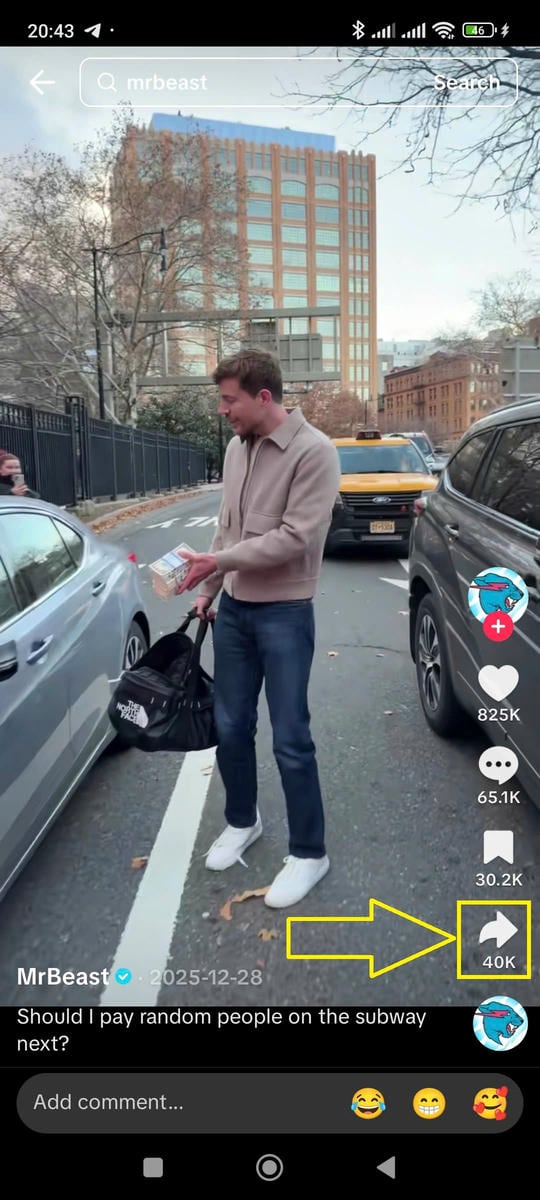
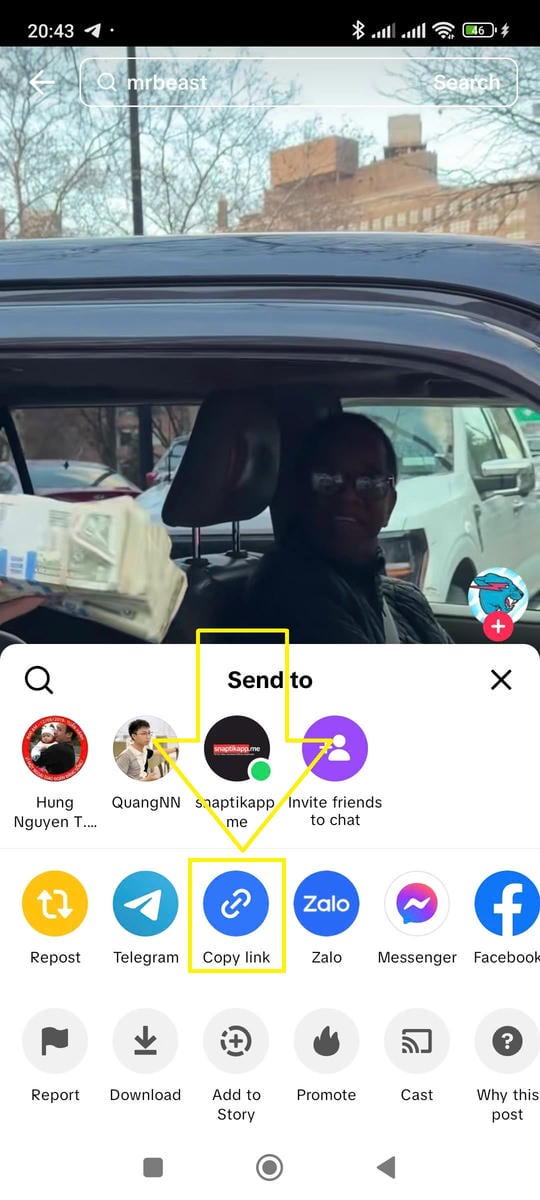
Step 1: Copy the TikTok link
Open TikTok, find the public video you want, tap Share, then choose Copy Link.
This is the cleanest way to start because TikGo works best with the real public post URL. If the link is shortened or wrapped by the app, TikGo will still try to resolve it, but a direct public link is always easier to troubleshoot.
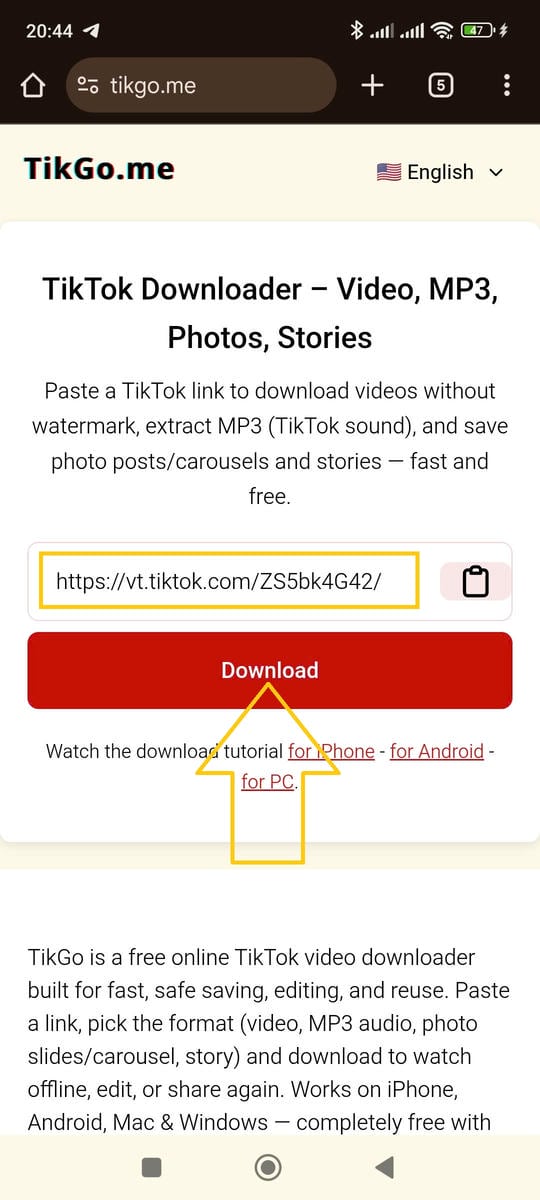
Step 2: Open TikGo in Chrome
Open Chrome on your Android phone, go to TikGo.me, and paste the link into the main input box.
Chrome is the first browser we tested for this guide, and it usually gives the clearest Android download behavior. Other browsers may work, but Chrome is the easiest place to start if you want the most predictable flow.
Step 3: Request the download options
Tap Download and wait for TikGo to check the public link.
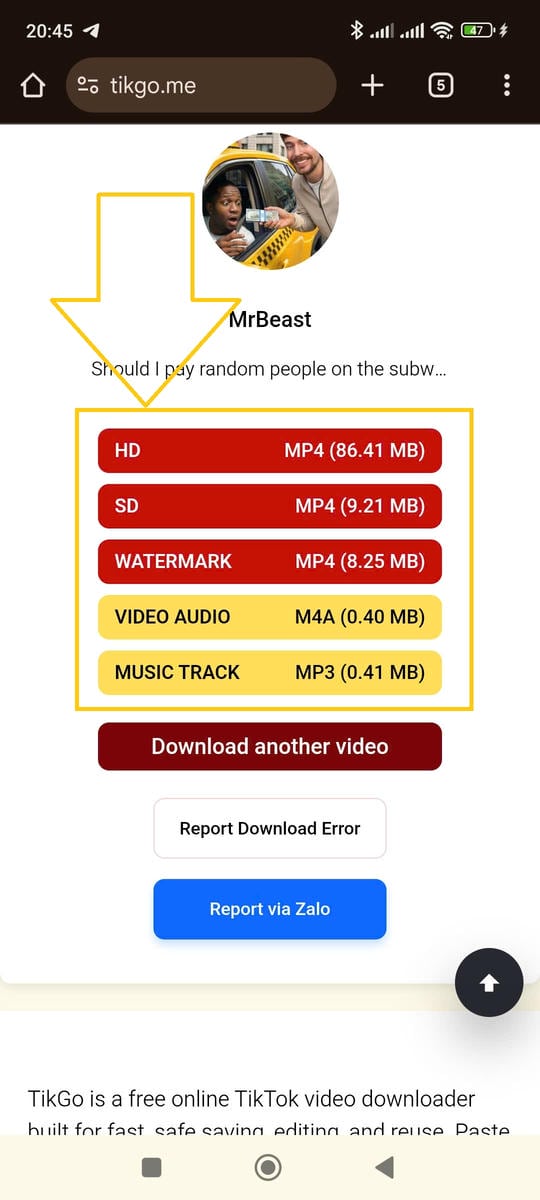
If the video is supported, TikGo will show the real files or formats it can return for that post. Depending on the source, that may include:
- a video without watermark
- another video variant
- an audio option such as MP3
Step 4: Let Android finish the file download
After you choose a file, Android and Chrome will handle the rest through the normal browser download flow.
You can usually watch the progress in one of these places:
- the Chrome download indicator
- the Android notification shade
- the browser's Downloads section
Where Android usually saves the file
One of the most common Android questions is not "Did the download work?" but "Where did the file go?"
On most Android phones, the file appears in one of these places:
- the
Downloadsfolder in your file manager - Chrome's own download history
- the Gallery or Photos app after Android finishes indexing the media
Different phone brands label the file manager differently:
- Samsung: My Files
- Xiaomi: File Manager
- Oppo / Vivo / Realme: often Files or File Manager
If the file does not appear in the Gallery immediately, that does not always mean the download failed. Sometimes Android saves the file first, then the media library updates a moment later.
Why one TikTok video may show different options from another
Not every public TikTok post behaves the same way. That is why one video may show multiple options while another shows only one.
Common reasons include:
- the original post exposes different source files
- the clean no-watermark version is or is not available
- the public link resolves differently than expected
- the file returned for that post is limited by the source rather than by your phone
TikGo only shows the options it can actually return. It does not pretend every public post has the same quality, format, or audio choices.
Common Android problems and how to fix them
The page opened inside an in-app browser
This is one of the most common causes of failed mobile downloads. If you opened TikGo from inside Facebook, Instagram, Telegram, X, or another app, use the app menu to open the page in Chrome instead.
Why this matters:
- in-app browsers can interrupt downloads
- some app browsers hide or block the normal file-save flow
- retrying in Chrome often fixes the issue without any other change
I pressed Download and nothing obvious happened
Check these places first:
- Chrome's download icon or menu
- the Android notification bar
- your file manager's
Downloadsfolder
If nothing appears, retry with:
- a fresh copy of the public TikTok URL
- Chrome instead of an in-app browser
- a more stable network connection
The file downloaded, but I cannot find it
Look in:
Downloads- Chrome's download history
- your phone's file manager search
If needed, search the file manager for .mp4 or the beginning of the downloaded filename.
I only see one format
That does not always mean anything is broken. TikGo only shows the file types the public post actually exposes and the service can return.
The public link fails completely
If a public link does not resolve, the cause may be:
- the video was removed
- the copied URL is incomplete
- the post is temporarily unavailable
- the source did not return a usable result
If you want help, send the public URL and your device/browser details through /contact.
Should you install TikGo as an Android app shortcut?
If you use TikGo often, adding it to your Android home screen can make the flow faster.
- Open TikGo in Chrome.
- Tap the browser menu.
- Choose Install App or Add to Home Screen if available.
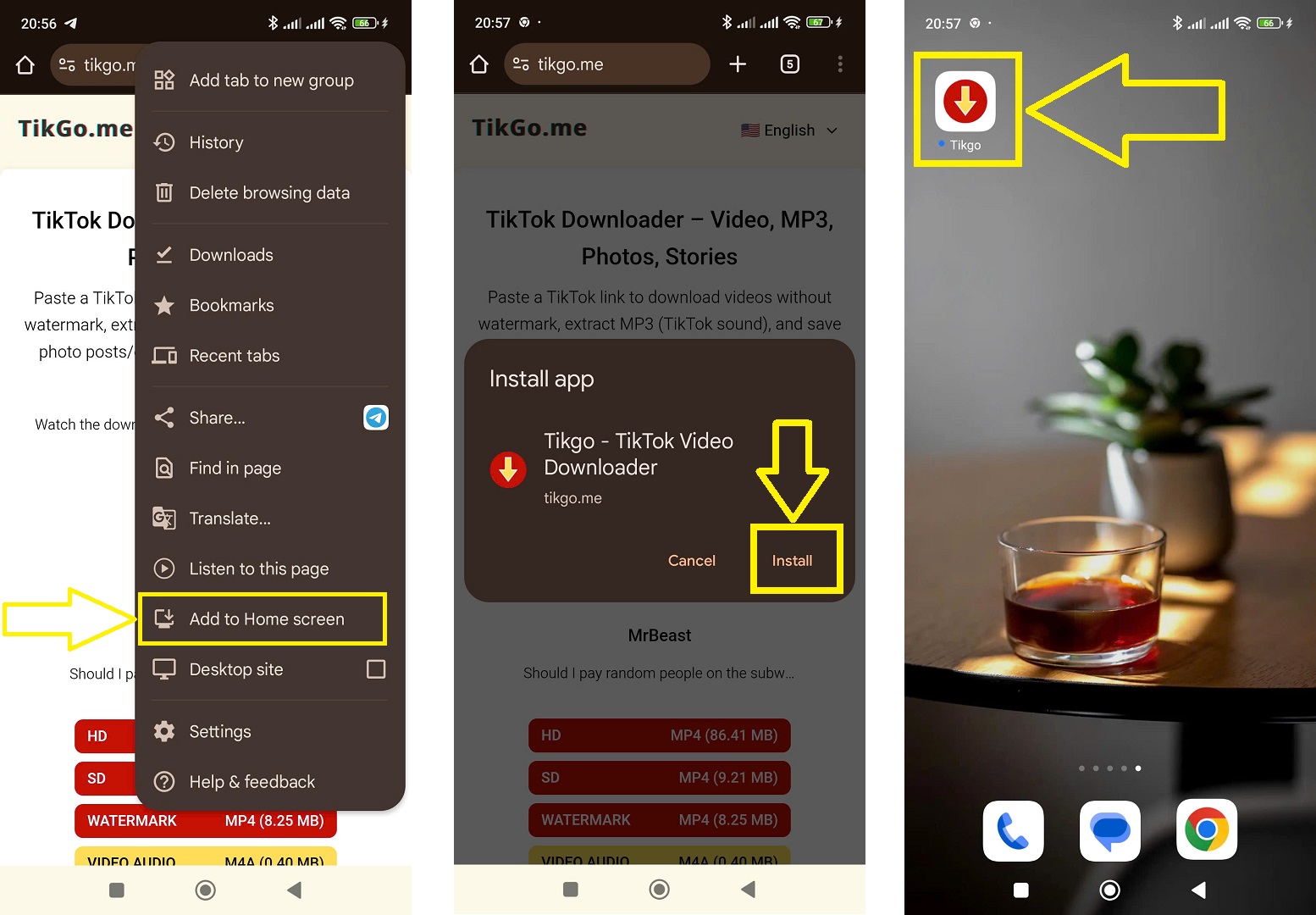
This does not install a separate APK. It simply gives you a faster shortcut back to the browser experience.
Safety and privacy notes
TikGo runs as a browser-based tool. For normal Android use, that means:
- no APK install is required
- no extra system profile is required
- the workflow stays inside your mobile browser
If you want more detail about how TikGo handles session protection, logs, and service limits, read:
FAQ
Where are downloaded videos saved on Android?
Usually in the Downloads folder first. Depending on the phone, the Gallery or Photos app may show the file after Android indexes it.
Does this guide only work on Xiaomi?
No. The guide was tested on a Xiaomi Redmi Note 11 Pro with Chrome, but the same browser-first flow is relevant for Samsung, Oppo, Vivo, Realme, Pixel, and other Android phones.
Do I need to install an app?
No. TikGo works in the browser. You can optionally add the site to your home screen as a shortcut, but that is not the same as installing an APK.
Are there daily download limits?
TikGo is free to use and does not currently publish a daily limit for normal public-link workflows.
What if the public TikTok link still does not work?
Use /contact and include:
- the public TikTok URL
- your Android device model if you know it
- your browser
- a screenshot or short note about what happened