
TikGo auto-filters Douyin share text and short links
March 27, 2026
TikGo Technical Review
- Xiaomi Redmi Note 11 Pro with Chrome on Android
- iPhone XR with Safari on iOS
This article follows TikGo's current behavior for public Douyin links, short links, copied share text, and the limits around large original files.
If you tap Share in Douyin and then Copy link, the result is often more than just a clean URL. It can look something like this:
0.56 复制打开抖音,看看【小婷.的作品】感觉至上 ... https://v.douyin.com/qpMfgM5vbuY/ Xzt:/ 01/06 [email protected]
You do not need to manually delete the extra text before pasting it into TikGo. TikGo's current runtime will look for the first public URL in the pasted text, then use that URL to identify Douyin correctly.
💡 TIP
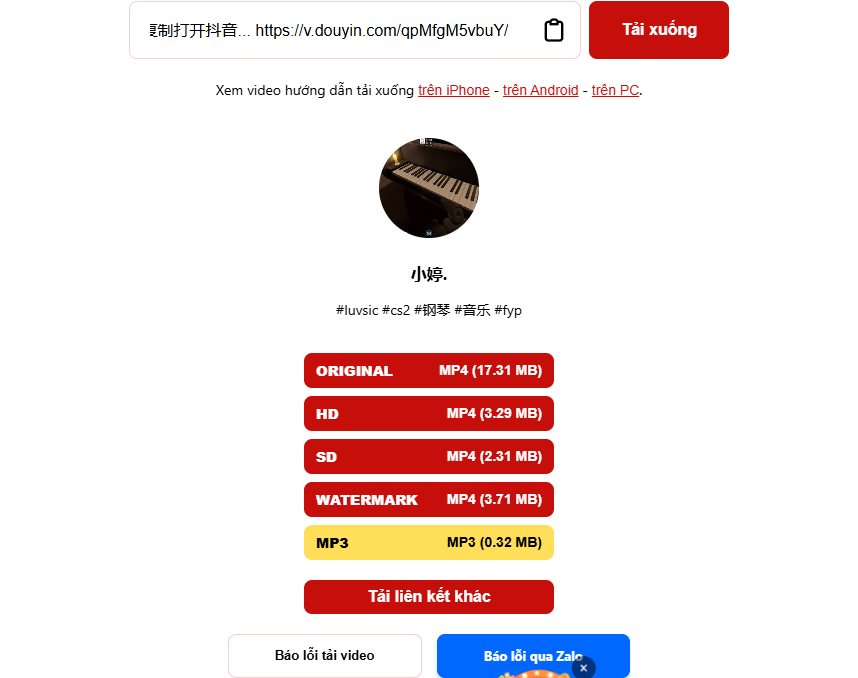
You can paste a Douyin share snippet with extra characters; TikGo can still extract a valid URL and show download options if the post is still public.
What TikGo handles when you paste Douyin share text
TikGo currently handles these inputs best:
https://www.douyin.com/video/...https://v.douyin.com/...https://www.iesdouyin.com/share/video/...- the full share text copied from Douyin, as long as a public URL is still inside it
The key point is that TikGo does not make you clean the link first. For share strings like 复制打开抖音... https://v.douyin.com/..., the current runtime will extract the first URL it finds, then move on to Douyin detection and check whether the post is still available for download.
What else TikGo can do on Douyin besides filtering share text
- Expand short links such as
v.douyin.comandiesdouyin.com - Download public Douyin videos in the browser
- Show an original video option when the source returns the original file and the size is still within the current stability threshold
- Support public
/note/...posts, but if a note has multiple videos, TikGo may currently return only the first video - Extract MP3 or show image slides when the original post truly provides those outputs
One limit to know before trying again and again
| Case | Current status | Notes |
|---|---|---|
| Douyin share text with extra characters | Supported | You can paste the whole block without cleaning it first. |
v.douyin.com or iesdouyin.com short links | Supported | TikGo expands them before showing available options. |
| Large original video files | Conditionally supported | The original file option may be hidden if it exceeds the current stability threshold, which is about 400 MB right now. |
Public /note/... posts | Supported with a note | If there are multiple videos, TikGo may currently return only the first one. |
| Private, deleted, removed, or livestream posts | Not supported | TikGo is for public content only. |
When to suspect the source, not the share text
If TikGo has already extracted the URL but there is still no available file, the usual reasons are:
- the original post has been deleted or switched to private
- the short link opens a post that no longer offers a downloadable file
- the post is region-limited or unstable on the source side
- the original file option is being hidden because it is too large at that moment
If the page is opening inside an in-app browser, try again in Safari or Chrome first:
Source notes and review method
This article follows TikGo's current frontend behavior when it extracts the first URL from the input field, maps it correctly to the Douyin platform, and the source-of-truth copy on the /douyin landing page for v.douyin.com, iesdouyin.com, copied share text, /note/... posts, and the large original file limit.
When this page says an input is supported, it means TikGo currently recognizes that public link format and can usually show an available download path in the browser. It does not mean that every public Douyin post will expose the same set of output formats.
Official references
TikGo also checks Douyin's official help page when reviewing the web and browser access context:
Use this documentation to understand the source-side access context. The logic for auto-extracting URLs, expanding short links, and deciding whether to hide or show download options on this page remains TikGo's own behavior in the current runtime.
If the Douyin link still fails
Use /contact and include:
- the public Douyin URL or the full share text you pasted
- your phone and browser
- the original link type:
v.douyin.com,iesdouyin.com,/video/..., or/note/... - a short description of which buttons TikGo showed after you pasted the link